

Is AppleCare+ Worth It for MacBook? My ₹71,272 Repair Bill Explained
AppleCare+ for MacBook may look like an optional extra when you are buying a new MacBook. I also thought the same. Then one screen repair bill changed my mind.
AppleCare+ is one of those things many MacBook buyers think about only after something goes wrong. I skipped it when I bought my MacBook Pro. Later, after my screen was damaged, I had to pay ₹71,272 after discount for a screen replacement.
That repair bill changed how I look at AppleCare+.
This guide is not written only for MacBook users in India. It is for MacBook users worldwide. Whether you bought your MacBook in India, UAE, the US, UK, Europe, Canada, Australia, Singapore, or anywhere else, the real question is the same: should you buy AppleCare+, or should you take the risk of paying a full repair bill later?
The exact AppleCare+ price and service fee can change based on your country, MacBook model, plan type, taxes, and Apple’s latest terms. However, the decision logic is simple. If one major repair can cost more than you are comfortable paying suddenly, AppleCare+ is worth serious consideration.
Quick Answer: Is AppleCare+ Worth It for MacBook?
Yes, AppleCare+ is worth considering for most MacBook users, especially if you own a MacBook Pro, travel often, carry your laptop daily, or use it for work, business, study, coding, design, editing, or digital marketing.
AppleCare+ may look like an extra cost during purchase. But when you compare it with the possible cost of a damaged display, liquid damage, or another major accidental repair, it can make much more sense.
In my case, I paid ₹71,272 for one MacBook Pro 14 screen replacement without AppleCare+. That single repair was enough to make me understand that MacBook protection is not something to ignore.
The answer is not the same for every person. A careful home user may think differently from a student, traveller, content creator, developer, business owner, or freelancer who carries a MacBook every day. But if your MacBook is important for your income, study, or daily work, AppleCare+ deserves serious attention.
Back to topMy Real MacBook Screen Repair Cost Without AppleCare+
I recently had a painful repair situation with my MacBook Pro 14 M4. The display was damaged, and I had to visit an Apple Authorised Service Provider for screen replacement.
Here is the real repair cost breakdown:
| Repair Detail | Amount / Information |
|---|---|
| MacBook model | MacBook Pro 14 M4 |
| Repair type | Screen replacement |
| Service location | iCare Calicut |
| Initial repair amount | ₹75,272 |
| Discount received | ₹4,000 |
| Final amount paid | ₹71,272 |
| AppleCare+ status | Not purchased |
This bill is from India, but the lesson is global. MacBook repairs can be expensive in many countries, especially when the display is damaged.
I have already shared the full repair story, bill details, and photos in my MacBook Pro 14 screen replacement cost in India guide.
The main point: I did not expect one screen repair to cost this much. That is exactly why MacBook buyers should think about AppleCare+ before an accident happens, not after.
Repair Proof: Screen Crack, Bill, Video, and Service Images
I wanted this article to be based on a real repair situation, not just a general opinion. The photos and video below show the damaged screen, the service process, and the payment proof from my repair.
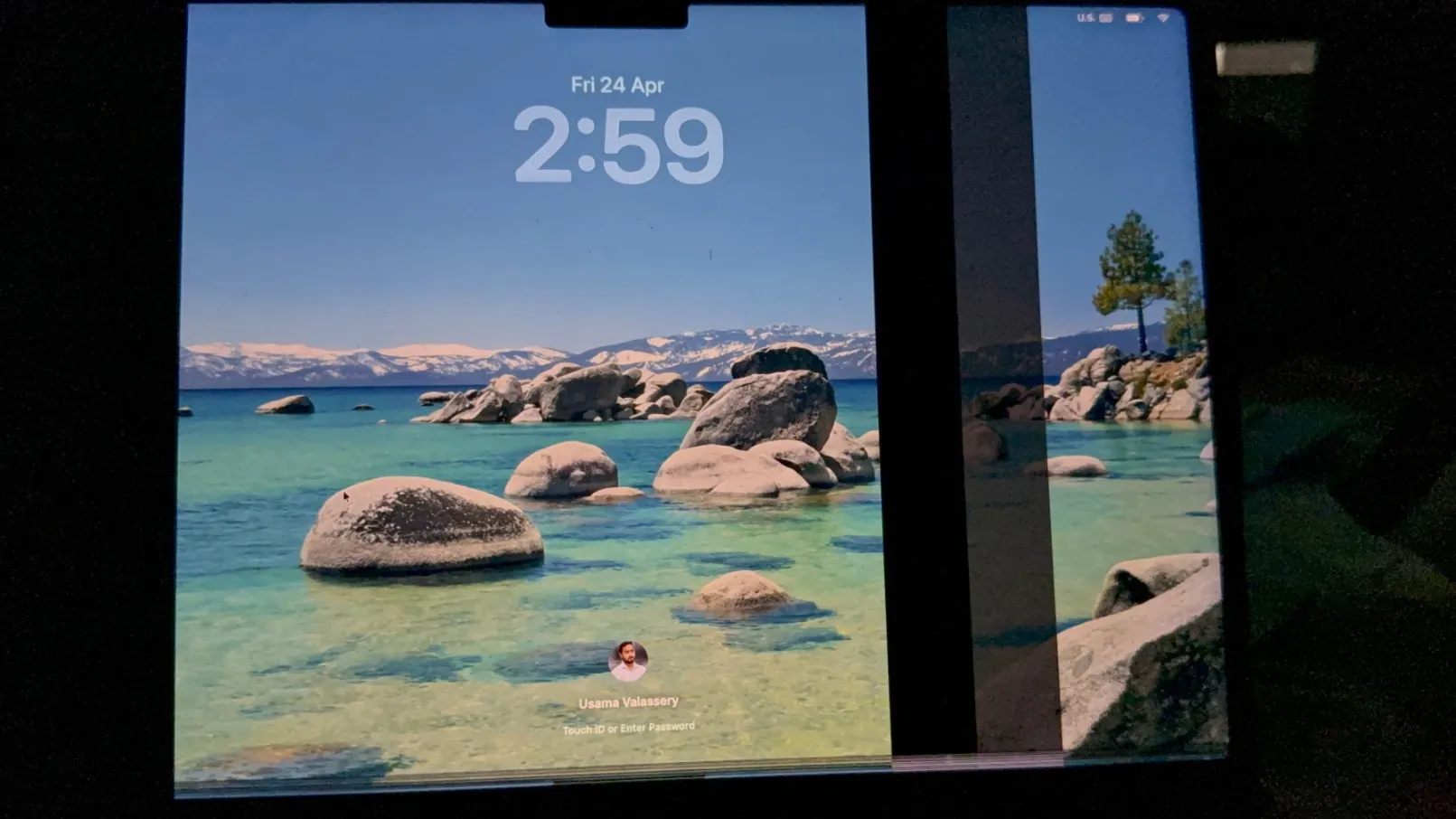
The broken MacBook Pro screen before replacement.
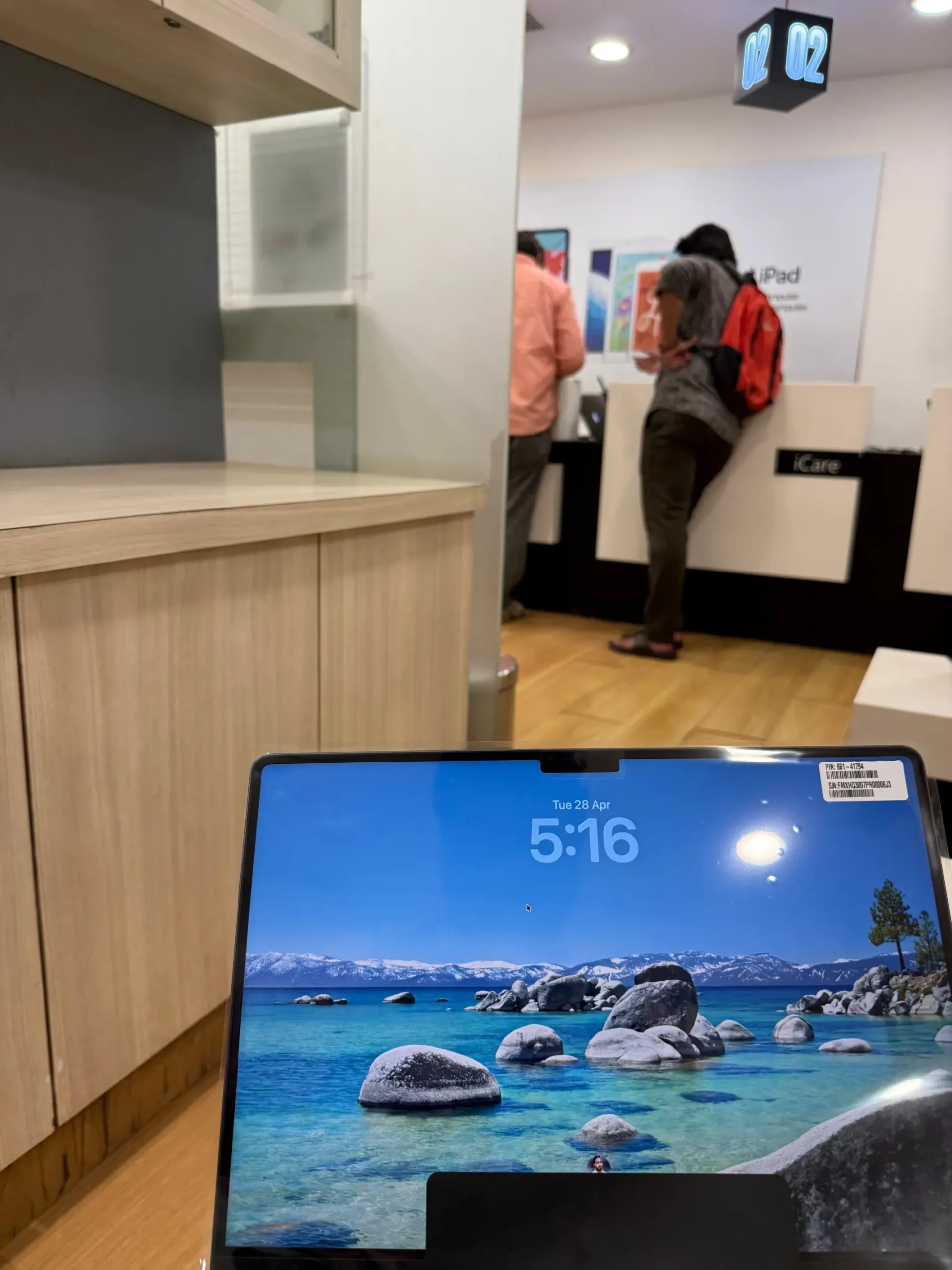
Screen replacement service completed through iCare Calicut.
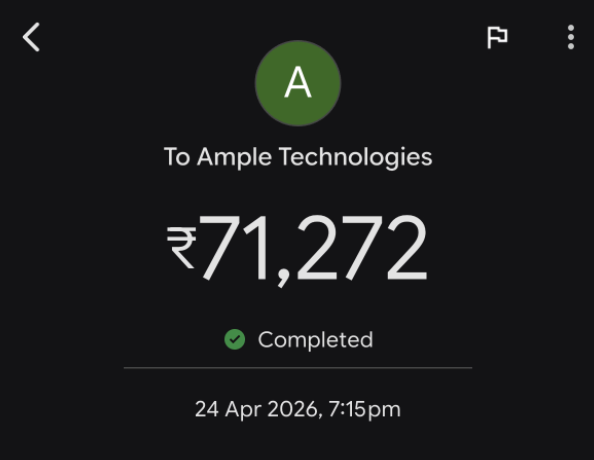
Payment proof related to the MacBook Pro screen replacement.
Short video showing the MacBook screen crack issue.
Why This AppleCare+ Guide Is Useful Worldwide
Some readers may wonder why a repair bill from India matters to MacBook users in other countries. The answer is simple. The currency may be different, but the problem is the same.
A cracked MacBook screen can be expensive anywhere. AppleCare+ pricing, taxes, service options, and service fees vary by country, but the value question is common for everyone: can you comfortably pay a sudden repair bill if something goes wrong?
If your MacBook is your main work device, one accident can affect your money, deadlines, studies, client work, and daily productivity. That is why AppleCare+ should be judged as part of the real ownership cost of a MacBook.
Same Risk
A MacBook screen can crack from pressure, a fall, or daily movement. That risk is not limited to one country.
Different Fees
AppleCare+ service fees and plan prices can vary by region. So every buyer should check local Apple terms.
Same Decision
The real choice is AppleCare+ cost vs the possible cost of a full repair later.
What Is AppleCare+ for MacBook?
AppleCare+ is Apple’s extended protection plan for MacBook users. It adds extra coverage beyond the standard limited warranty and includes accidental damage protection, subject to Apple’s terms and service fees.
A standard Apple warranty is mainly for manufacturing defects. It does not usually protect you from accidental damage like a cracked screen, liquid spill, fall, pressure damage, or other physical damage.
AppleCare+ is different because it is designed for real-life accidents. Apple’s official AppleCare information mentions repairs for accidents such as drops and spills, battery service when eligible, and priority access to Apple experts. You can read Apple’s own AppleCare information on the AppleCare+ for Mac page.
What Does AppleCare+ Cover for MacBook?
AppleCare+ for MacBook can help with common repair situations such as:
- Accidental screen damage
- External enclosure damage
- Other accidental damage, including spills
- Battery service if the battery meets Apple’s eligibility condition
- Apple-certified repairs using genuine Apple parts
- Priority support from Apple experts
- Repair support through Apple service options, depending on your country or region
This is why AppleCare+ matters. Many MacBook buyers think the standard warranty is enough. But warranty coverage and accidental damage protection are not the same thing.
Important: AppleCare+ does not mean every type of damage is covered without conditions. Service fees, exclusions, taxes, claim rules, and repair options can vary. Always check the latest AppleCare+ terms for your country and MacBook model.
AppleCare+ Service Fees Are Different by Country
This is one of the most important points for a global audience. AppleCare+ is available in many regions, but the price, service fee, tax treatment, and exact terms can vary.
For example, Apple’s Mac terms for the US mention a service fee for a screen-only accidental damage claim or external enclosure-only accidental damage claim, and a different fee for other accidental damage claims. You should always confirm the latest amount from Apple before buying or claiming AppleCare+.
| Country / Region Example | Screen or External Enclosure Damage | Other Accidental Damage | Important Note |
|---|---|---|---|
| US / Canada | Apple’s Mac terms list a separate Tier 1 accidental damage service fee | Apple’s Mac terms list a separate Tier 2 accidental damage service fee | Fees exclude applicable taxes and can change based on Apple’s terms. |
| UK / Europe / Australia | AppleCare+ service fees may be different by country | Other accidental damage fees may also differ by country | Check the AppleCare+ legal page for the exact local terms. |
| India and other regions | Check Apple’s local AppleCare+ page or coverage page | Check Apple’s local AppleCare+ page or coverage page | Plan availability, fees, taxes, and renewal options can vary by country. |
For the latest information, check Apple’s AppleCare+ terms and service fees for your country or region.
AppleCare+ vs No AppleCare+: Real Cost Comparison
The easiest way to understand AppleCare+ is to compare both situations.
| Situation | Without AppleCare+ | With AppleCare+ | What It Means |
|---|---|---|---|
| Screen damage | You may need to pay the full repair cost | Covered with AppleCare+ service fee, if eligible | This is where AppleCare+ can reduce a painful repair bill |
| External enclosure damage | Full repair cost may apply | Covered with service fee, if eligible | Useful if the body is damaged after a drop or pressure impact |
| Liquid damage | Can be very expensive | Usually treated as other accidental damage with service fee, if eligible | Important for daily users, students, and travellers |
| Battery issue | Depends on warranty status and battery condition | Battery service may be covered if eligible | Useful for long-term MacBook users |
| Manufacturing defect | Standard warranty may cover it | AppleCare+ extends support and coverage period | Better peace of mind for expensive devices |
In my case, the question became very clear after the repair. Would I rather pay a sudden ₹71,272 bill, or would I prefer to have protection already in place?
After going through the repair process, my answer changed completely.
Normal Apple Warranty vs AppleCare+: What Is the Difference?
This is where many MacBook buyers get confused.
Every new MacBook comes with Apple’s standard limited warranty. That warranty usually helps with manufacturing defects. However, accidental damage is a different matter.
If your MacBook screen cracks because of pressure, a fall, or physical impact, the standard warranty may not protect you from a high repair bill. AppleCare+ adds accidental damage coverage, subject to service fees and eligibility.
| Feature | Standard Warranty | AppleCare+ |
|---|---|---|
| Manufacturing defects | Usually covered during warranty period | Extended support and coverage |
| Accidental screen damage | Usually not covered | Covered with service fee, if eligible |
| Liquid damage | Usually not covered | Covered as accidental damage with service fee, if eligible |
| Battery service | Limited coverage | Covered if the battery meets Apple’s eligibility condition |
| Support period | Basic limited warranty period | Longer support depending on the AppleCare+ plan |
Can You Buy AppleCare+ After Buying a MacBook?
Yes, AppleCare+ can usually be added after buying a new MacBook, but you should not delay it.
Apple Support says AppleCare+ can be added within 60 days of buying a new Apple device. For a new Mac, Apple also mentions monthly or annual renewal options where available. You can check this through Apple’s official support page about how to add AppleCare coverage to your Apple device.
You can usually check AppleCare+ eligibility through:
- Mac settings
- Apple Support
- Apple’s coverage check page
- Apple Store support
- Apple Authorised Service Provider guidance
If your MacBook is still within the eligible period, check it as early as possible. Once the purchase window is over, you may not get the same option again.
Why MacBook Screen Repair Can Be So Expensive
MacBook displays are not like ordinary laptop screens. Apple displays are thin, bright, colour accurate, and tightly integrated into the laptop body. On MacBook Pro models, the display is one of the most expensive parts of the device.
That is great when you are using the laptop every day. But when the display is damaged, the repair can become very expensive.
My MacBook Pro 14 M4 screen replacement bill is a real example. I paid ₹71,272 after discount. That amount alone is enough to make many users rethink the value of device protection.
This is why AppleCare+ should not be viewed only as an optional add-on. For many people, it should be part of the real cost of owning a MacBook.
Who Should Strongly Consider AppleCare+ for MacBook?
AppleCare+ is not only for careless users. Even careful users can face accidental damage. A small fall, pressure inside a bag, a slip from the desk, or a cup of liquid near the laptop can create a costly repair situation.
You should strongly consider AppleCare+ if you are:
- A student carrying your MacBook to college, classes, or library
- A freelancer using your MacBook for client work
- A digital marketer, designer, developer, editor, or content creator
- A business owner using your MacBook every day
- A person who travels often
- Someone who works from cafes, coworking spaces, or client offices
- Buying a MacBook Pro 14-inch or 16-inch
- Planning to keep the MacBook for three years or more
- Not ready to pay a sudden high repair bill
If your MacBook is your main work machine, AppleCare+ becomes more important. A damaged MacBook can affect your work, deadlines, income, studies, and daily productivity.
Who May Not Need AppleCare+?
AppleCare+ is useful, but not everyone may need it equally.
You may skip AppleCare+ if:
- You use your MacBook only at home
- You rarely travel with it
- You keep it on a desk most of the time
- You are ready to take the full repair risk
- You are buying a lower-cost MacBook and do not want extra protection cost
- You already have another valid device insurance plan that clearly covers accidental damage
Even then, do not decide only by looking at the AppleCare+ price. Compare it with the possible cost of one major repair.
Is AppleCare+ Worth It for MacBook Air?
AppleCare+ can be useful for MacBook Air users too. MacBook Air is thin, light, and easy to carry, which is exactly why many people take it everywhere.
Students, office workers, writers, marketers, and frequent travellers often choose MacBook Air because it is portable. But daily movement also increases the chance of accidental damage.
If you carry your MacBook Air every day, use it outside your home, or plan to keep it for many years, AppleCare+ is worth checking.
Is AppleCare+ Worth It for MacBook Pro?
For MacBook Pro users, AppleCare+ makes even more sense.
MacBook Pro models are expensive. The displays are costly, the parts are costly, and repair bills can be painful. My own MacBook Pro 14 M4 repair bill proves that clearly.
If you are buying a MacBook Pro 14-inch or 16-inch, especially for professional work, AppleCare+ should be part of your purchase decision. The laptop itself is a serious investment, and protecting it is practical.
What If You Buy a MacBook in One Country and Use It in Another?
This is an important point for international buyers, travellers, expats, and people who buy Apple products from abroad.
Apple service options, AppleCare+ fees, taxes, replacement parts, and repair timelines may vary by country or region. So, if you bought your MacBook in one country and use it in another, do not assume the cost and process will be exactly the same everywhere.
Before buying or repairing, check your coverage using your MacBook serial number and confirm the details with Apple Support.
My Biggest Mistake: Thinking AppleCare+ Was Not Necessary
When I bought my MacBook, I did not take AppleCare+. At that time, it felt like an extra expense. I thought I would take care of the device properly.
But that is the problem. Accidents do not happen only to careless people.
After the screen damage, the repair bill came to ₹75,272 before discount. Even after receiving a ₹4,000 discount, I still paid ₹71,272.
That one bill changed how I look at AppleCare+.
Now, if someone asks me whether AppleCare+ is worth it for MacBook, I will not give a casual answer. I will say this: check the repair cost first, then decide. For expensive MacBooks, AppleCare+ can make a lot of sense.
Practical Tips Before Buying AppleCare+
Before buying AppleCare+, check these points carefully:
- Confirm your MacBook model
- Check AppleCare+ eligibility using your device serial number
- Check whether your purchase is still within the allowed period
- Read the service fee details for your country
- Check whether the plan is monthly, annual, or fixed term
- Understand what accidental damage means under Apple’s terms
- Keep your purchase invoice safely
- Do not wait until your MacBook is damaged
AppleCare+ is not something you should think about only after an accident happens. The decision has to be made early.
AppleCare+ Is Not Cheap, But MacBook Repair Is Not Cheap Either
Many people avoid AppleCare+ because they feel it is expensive. That feeling is understandable. When you already paid a big amount for a MacBook, adding more money for protection does not feel good.
But the real comparison should not be AppleCare+ price vs zero cost.
The real comparison should be AppleCare+ price vs possible repair cost.
In my case, the possible repair cost became real. I paid ₹71,272 for screen replacement. That is the kind of bill most MacBook users do not expect until it happens.
Final Verdict: Should You Buy AppleCare+ for MacBook?
If you are buying a MacBook Pro, AppleCare+ is worth serious consideration. If you are buying a MacBook Air and carrying it daily, it is also worth checking.
For very careful home users, AppleCare+ may feel optional. But for students, professionals, travellers, creators, developers, marketers, and business users, it can be a smart protection plan.
My honest verdict is simple. After paying ₹71,272 for one MacBook screen repair, I would not ignore AppleCare+ again.
A MacBook is a premium device. The repair cost can also be premium. So, before you skip AppleCare+, check the real repair costs in your country and make the decision carefully.
Read My Full MacBook Screen Repair Story
If you want to see the full repair details, bill amount, damaged screen photos, and service proof, read my full repair experience here:
FAQs About AppleCare+ for MacBook
Yes, AppleCare+ is worth considering for MacBook users, especially if they own a MacBook Pro, travel often, carry the laptop daily, or use it as their main work or study device. One accidental repair can be expensive without AppleCare+.
AppleCare+ can cover accidental MacBook screen damage, subject to Apple’s terms, eligibility, and service fees. The exact fee can vary by country and MacBook model.
Usually, accidental screen cracks are not covered under the standard limited warranty. The normal warranty mainly covers manufacturing defects. Accidental damage protection is one of the main reasons people consider AppleCare+.
My MacBook Pro 14 M4 screen replacement cost was ₹75,272 before discount. After a ₹4,000 discount, I paid ₹71,272.
Yes, AppleCare+ can usually be added within 60 days of buying a new Apple device. For a new Mac, renewal options may be monthly or annual depending on the country and plan availability.
No. AppleCare+ service fees can vary by country or region. Users should check Apple’s latest AppleCare+ terms for their country and MacBook model before making a decision.
Yes, AppleCare+ can be useful for students because they often carry their MacBook to classes, libraries, hostels, and travel locations. Daily movement increases the chance of accidental damage.
AppleCare+ can be useful for both. However, it may feel more important for MacBook Pro users because MacBook Pro models are more expensive and display repairs can be costly.
Apple service options may vary by country or region. If you bought your MacBook in one country and use it in another, check your coverage with Apple Support before repair.
If you do not buy AppleCare+, you may need to pay the full repair cost for accidental damage. In my case, one MacBook Pro screen replacement cost ₹71,272 after discount.
Note: AppleCare+ pricing, service fees, claim rules, taxes, and availability can change. Always check Apple’s official AppleCare+ page or Apple Support for the latest details in your country.