

Does Apple Warranty Cover a Cracked MacBook Screen?
A cracked MacBook screen can feel like a costly shock. One moment the laptop is working perfectly. The next moment, there is a line, black patch, glass crack, or a fully damaged display.
So the main question is simple: does Apple warranty cover a cracked MacBook screen? In most cases, the answer is no. Apple’s standard warranty usually covers manufacturing defects, not accidental damage. AppleCare+ can help, but it normally comes with a service fee.
Quick answer: Apple’s standard warranty usually does not cover a cracked MacBook screen if the crack happened because of accidental damage. If the screen broke after a drop, pressure, impact, liquid spill, or an object left between the keyboard and display, Apple will normally treat it as a paid repair. AppleCare+ can reduce the repair cost, but it still comes with a service fee.
Quick Answer: Is a Cracked MacBook Screen Covered by Apple Warranty?
Usually, no. A cracked MacBook screen is normally not covered by Apple’s standard warranty when the crack is caused by accidental damage. Apple’s warranty is mainly for defects in materials or workmanship, not for physical damage caused by daily use accidents.
If your MacBook display fails without any visible damage, the result can be different. For example, if the display has lines, flickering, backlight issues, or a black screen with no crack, Apple or an Apple Authorised Service Provider may inspect it to check whether it is a hardware defect.
But if there is a visible crack, pressure mark, liquid sign, dent, bent corner, or impact damage, Apple will usually treat it as accidental damage.
| Situation | Standard Apple Warranty | AppleCare+ |
|---|---|---|
| Manufacturing display defect | May be covered after inspection | May be covered after inspection |
| Screen cracked after a drop | Usually not covered | Covered with service fee |
| Pressure crack from bag | Usually not covered | Covered with service fee |
| Liquid damage | Usually not covered | May be covered with accidental damage fee |
| Screen damage with body dent | Usually not covered | May move to a higher service fee |
| Damage after unauthorised repair | Risky | May affect Apple’s service decision |
The most important point is simple: Apple inspection decides the final answer. A crack that looks small to you may still be treated as accidental damage if Apple finds impact, pressure, or extra damage.
Back to topApple Warranty vs AppleCare+: What Is the Real Difference?
Many MacBook users mix up Apple’s standard warranty and AppleCare+. They are not the same.
Apple’s standard warranty is meant to protect you from manufacturing defects. It is not a damage protection plan for accidents. Apple’s Mac repair page clearly says warranty does not cover accidental damage. If the issue is not covered by warranty or consumer law, there will be a repair cost.
AppleCare+ is an optional protection plan. It adds accidental damage protection, but it does not mean every repair becomes free. You still pay the AppleCare+ service fee for accidental damage, and the exact amount depends on your country, product, and damage type.
Standard Apple Warranty
Best for manufacturing faults, hardware defects, and problems Apple confirms are not caused by accidental damage.
AppleCare+
Best for users who want accidental damage protection for drops, spills, cracked screens, and daily-use accidents.
Out-of-Warranty Repair
Applies when the device is not covered by warranty, AppleCare+, service program, or applicable consumer law.
In simple words: standard warranty protects you from product defects. AppleCare+ helps protect you from many accidents, but with a fee.
Back to topWhat Apple’s Standard Warranty Usually Covers
Apple’s standard warranty can help when the MacBook issue is not caused by accidental damage. This can include genuine hardware problems that happen during the warranty period.
It may help with issues such as:
- Display failure without visible physical damage
- Hardware defects confirmed by Apple inspection
- Battery, keyboard, trackpad, logic board, or internal component issues caused by defects
- Problems with included Apple accessories, if the issue qualifies
- Display lines, flickering, or black screen issues that are not linked to physical damage
For example, if your MacBook screen suddenly stops working without any crack or accident, Apple may check whether the issue is covered. But if the display has visible crack marks, the case becomes different.
Back to topWhat Apple Warranty Does Not Usually Cover
Apple warranty usually does not cover problems caused by accidents, misuse, or external damage. That is the reason a cracked MacBook screen is usually treated as a paid repair.
Apple warranty does not usually cover:
- Cracked display glass
- Screen damage caused by dropping the MacBook
- Pressure damage from a bag or backpack
- Damage from closing the lid with an object inside
- Liquid spill or moisture damage
- Dented corners or bent enclosure
- Damage after unauthorised repair
- Cosmetic damage that does not affect normal function
- Damage caused by misuse, abuse, or external reasons
Important: A small object can break a MacBook display. Earbuds, camera covers, coins, pen caps, paper clips, cards, and even thick dust particles can create pressure when the lid is closed.
Does AppleCare+ Cover a Cracked MacBook Screen?
Yes, AppleCare+ can cover a cracked MacBook screen, but you normally pay a service fee.
AppleCare+ for Mac covers accidental damage from handling, such as drops and liquid spills, subject to Apple’s terms and service fees. For Mac, AppleCare+ usually separates accidental damage into screen-only or external enclosure-only damage and other accidental damage.
That means a simple screen-only crack may cost less with AppleCare+ than a repair without AppleCare+.
But remember: if your MacBook has extra damage beyond the screen, Apple may charge the higher accidental damage fee. A clean screen crack and a screen crack with a dented body may not be treated the same.
AppleCare+ Mac Screen Damage Fees by Country
AppleCare+ fees are not the same everywhere. They depend on your country or region, Mac model, tax rules, and Apple’s current terms.
For Mac, AppleCare+ usually separates accidental damage into two main categories:
- Screen-only or external enclosure-only damage: lower service fee
- Other accidental damage: higher service fee
| Country or Region | Screen or External Enclosure Damage | Other Accidental Damage | Official Apple Reference |
|---|---|---|---|
| United States | US$99 | US$299 | AppleCare+ for Mac US terms |
| Canada | C$129 | C$379 | AppleCare+ for Mac Canada fees |
| United Kingdom | £79 | £229 | AppleCare+ for Mac UK pricing appendix |
| Australia | A$149 | A$429 | AppleCare+ for Mac Australia terms |
| United Arab Emirates | AED 349 | AED 1,149 | AppleCare+ for Mac UAE terms |
| India | ₹5,290 to ₹8,900 | ₹15,900 to ₹25,900 | AppleCare+ India pricing |
| Other countries | Check local Apple page | Check local Apple page | Apple Mac repair page |
These fees can change. Before you visit Apple or an Apple Authorised Service Provider, check your local Apple repair page and your AppleCare+ agreement.
Good to know: AppleCare+ can make a big difference when the damage is screen-only. But if Apple finds extra damage, the repair may move to the higher accidental damage fee.
What Counts as Screen-Only Damage?
Screen-only damage usually means the display is damaged, but the rest of the MacBook does not have serious extra damage that blocks the repair.
May Be Screen-Only Damage
- Display glass crack only
- Internal display panel damage without major body damage
- Visible display damage without hinge or enclosure damage
- No liquid damage signs
- No major dents near the display, hinge, or top case
May Become Other Accidental Damage
- Screen crack plus bent body
- Screen crack plus liquid damage
- Screen crack plus damaged hinge
- Screen crack plus logic board issue
- Screen crack with multiple impact points
Apple’s terms say the lower screen-only fee applies only when there is no additional damage that would prevent Apple from repairing the display or enclosure. That is why the final quote can change after inspection.
Back to topWhy Apple Inspection Matters Before the Final Repair Cost
Many users want a fixed answer before visiting Apple. But with MacBook screen damage, the final cost usually depends on inspection.
Apple or an Apple Authorised Service Provider may check:
- Display glass condition
- Internal display panel damage
- Backlight and display cable condition
- Hinge area
- Top case and bottom case
- Dents, bends, or pressure marks
- Liquid contact indicators
- Battery condition
- Logic board signs
- Previous repair or non-genuine part signs
This is why two MacBooks with similar-looking screen cracks can get different repair quotes. One may be screen-only damage. Another may have extra enclosure, hinge, or liquid damage.
Back to topCan Apple Replace a Cracked MacBook Screen for Free?
Usually, Apple will not replace a cracked MacBook screen for free if the crack was caused by accidental damage.
There are only a few situations where the result can be different:
- Manufacturing defect: Apple confirms the screen issue was not caused by accidental damage.
- Consumer law: Some countries have consumer protection rules that may apply in special cases.
- Apple service program: Apple announces a repair program for a known issue affecting certain models.
- AppleCare+ active: It may not be free, but the repair fee can be much lower than out-of-warranty repair.
If the display has a visible crack, Apple will usually check whether the damage came from pressure, impact, liquid, or another outside cause.
Back to topReal Repair Example: My MacBook Pro 14 Screen Cost
This is not only a general guide. I faced this problem personally with a MacBook Pro 14. The screen damage looked like one repair issue, but the actual repair cost became a serious amount.
In my case, the MacBook Pro 14 screen replacement cost reached ₹71,272 without AppleCare+. That repair bill is one of the main reasons I started checking Apple warranty, AppleCare+, and screen damage rules more carefully.
I shared the full details, photos, and repair experience in this related post: MacBook Pro 14 screen replacement cost in India.
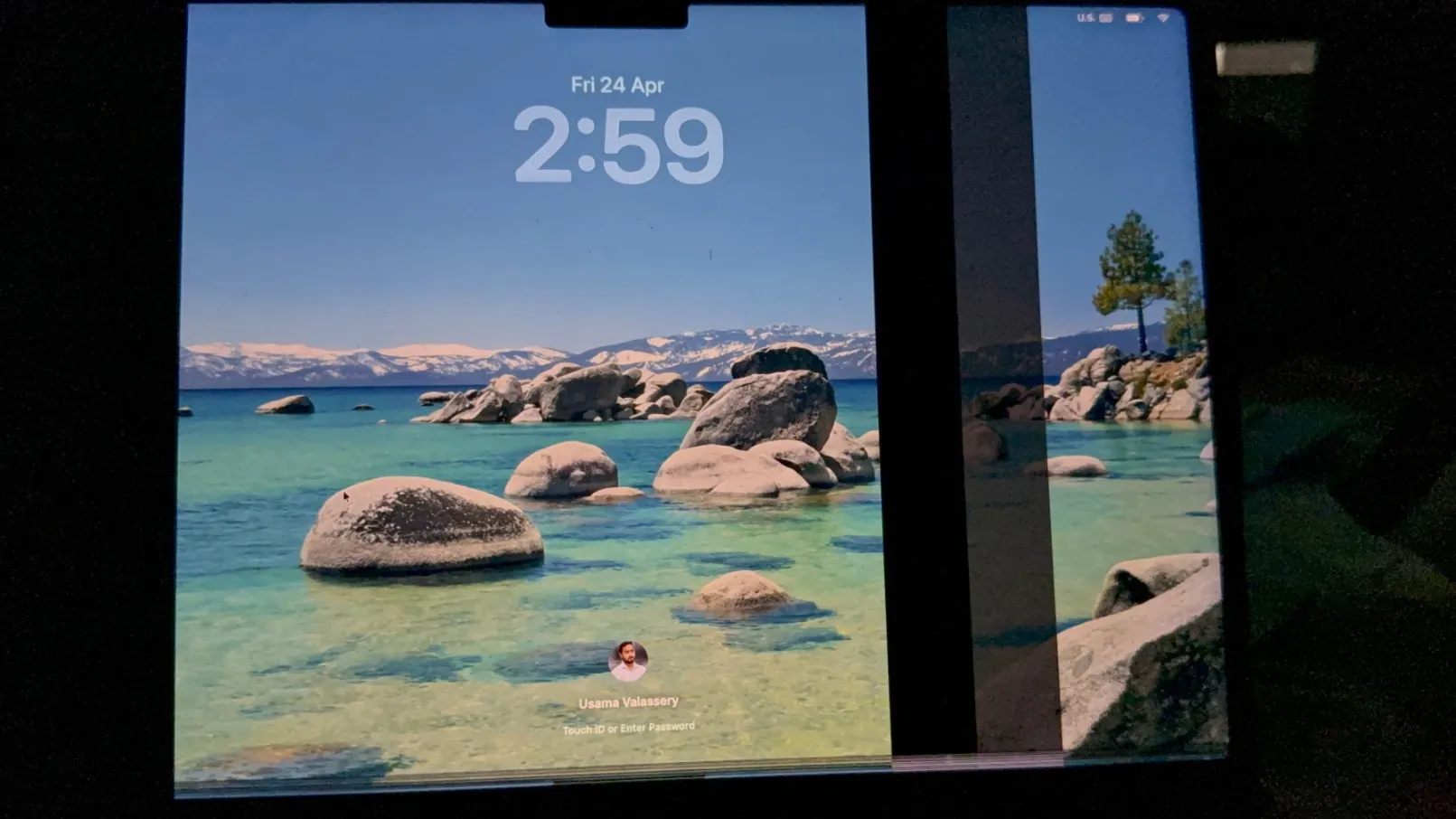
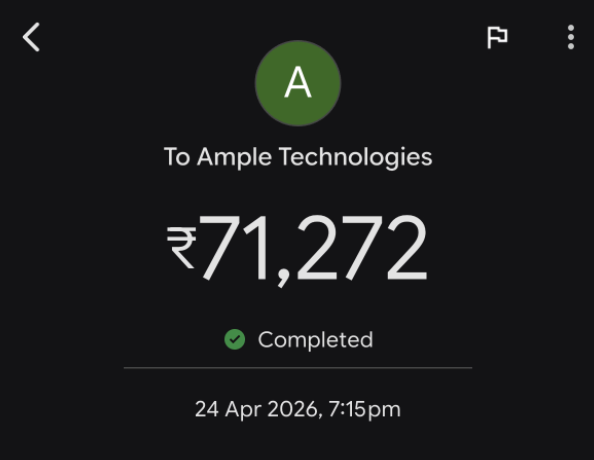
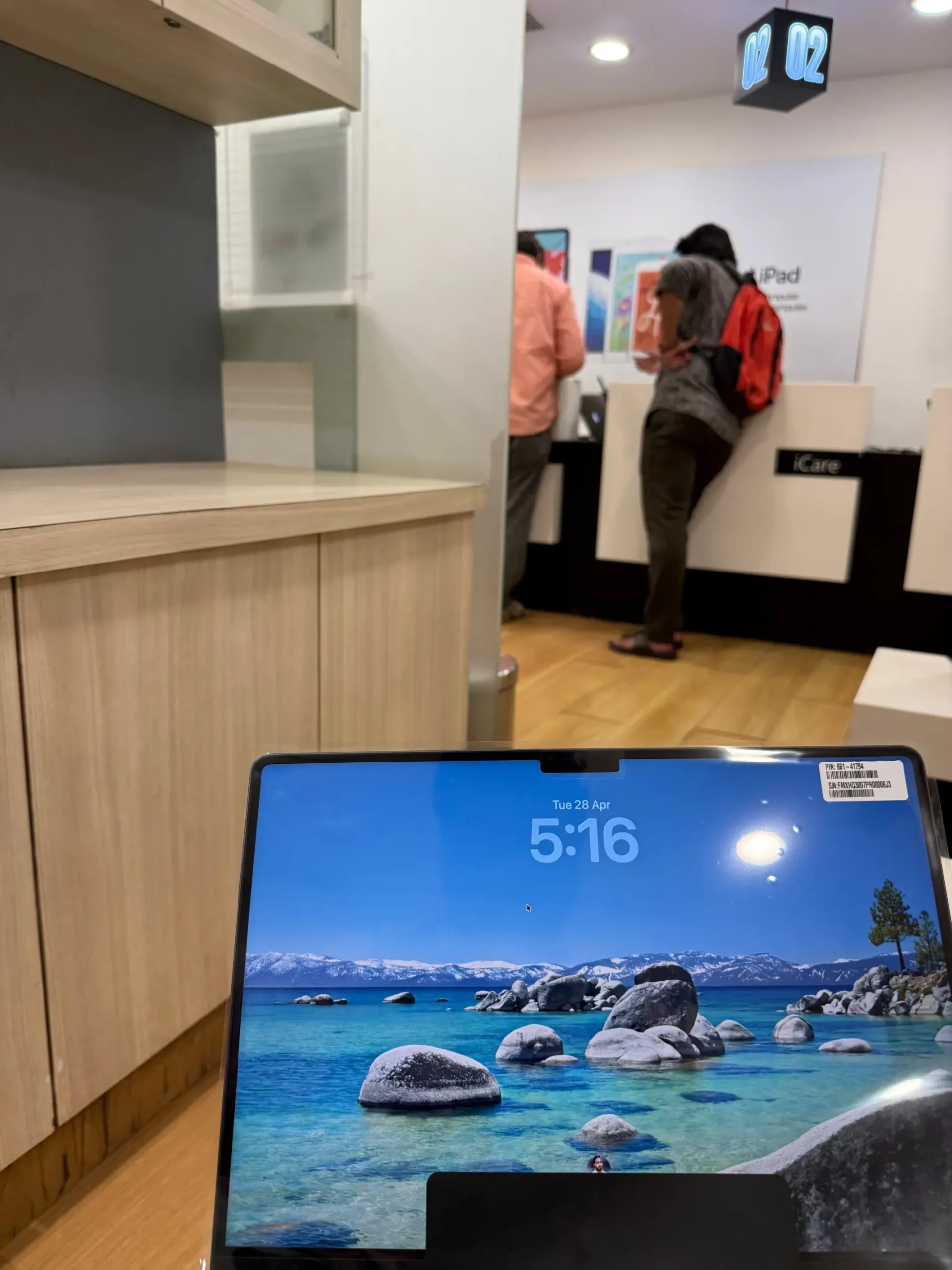
Real lesson: MacBook screen damage can become expensive very quickly, especially on newer MacBook Pro models. If you carry your MacBook every day, AppleCare+ is worth checking before anything happens.
Is AppleCare+ Worth It for MacBook Users?
AppleCare+ is not necessary for everyone. But it can be very useful if you own a high-value MacBook, travel often, or carry your laptop daily for work or study.
AppleCare+ may be worth considering if:
- You own a MacBook Pro or high-spec MacBook Air
- You travel with your MacBook often
- You work from cafes, offices, airports, or client locations
- You keep your MacBook in a backpack every day
- You cannot risk a sudden expensive repair bill
- You want Apple-authorised service and genuine parts
- You plan to keep the MacBook for several years
I explained this with my own repair bill in this related post: Is AppleCare+ worth it for MacBook after my ₹71,272 repair bill?
The short answer is this: if your MacBook is expensive and you use it every day, AppleCare+ can protect you from a much bigger repair shock later.
Back to topWhat to Do Immediately After Your MacBook Screen Cracks
If your MacBook screen cracks, do not rush into the first repair option you find. A few careful steps can protect your data, reduce further damage, and help you avoid repair mistakes.
Stop Moving the Lid
A small crack can spread when the lid moves. If the display still works, use it carefully and avoid extra pressure.
Back Up Your Data
Use Time Machine, iCloud, an external SSD, or another backup method before giving the MacBook for service.
Take Photos and Videos
Record the screen crack, body condition, corners, hinge area, keyboard area, and bottom case.
Check Apple Coverage
Check whether your MacBook has standard warranty, AppleCare+, or expired coverage using Apple’s official coverage page.
Contact Apple Support
Contact Apple or an Apple Authorised Service Provider before choosing a local repair shop.
Do Not Open It Yourself
Modern MacBooks are compact, and a display repair is not a simple DIY job unless you are trained.
Also, do not hide accidental damage. If Apple asks how the accident happened, explain it clearly. Apple may ask for details before processing an AppleCare+ accidental damage claim.
Back to topShould You Repair a MacBook Screen Through Apple or a Local Shop?
This is one of the biggest decisions after a cracked MacBook screen. A local shop may look cheaper at first, but the cheapest option is not always the safest option.
| Repair Option | Benefits | Risks |
|---|---|---|
| Apple or Apple Authorised Service Provider | Genuine parts, official service record, better resale confidence, safer for newer MacBooks | Can be expensive without AppleCare+ |
| Local repair shop | May quote a lower price, easier availability in some areas | Non-genuine display risk, colour issues, brightness issues, future service risk, resale value impact |
Apple or an Apple Authorised Service Provider is usually the safer choice if your MacBook is new, expensive, under warranty, covered by AppleCare+, or important for your work.
For older MacBooks, some users compare Apple and trusted third-party repair quotes. But for M-series MacBook Air and MacBook Pro models, authorised service is usually the more reliable route.
Back to topCan You Buy AppleCare+ After the Screen Is Already Cracked?
Usually, you cannot buy AppleCare+ to cover damage that already happened.
AppleCare+ normally has to be added during an eligible period after buying a new Apple device. Apple may also require the device to be in good condition before coverage can be added.
If your MacBook screen is already cracked, Apple may not allow AppleCare+ to be added for that damage. The best time to think about AppleCare+ is before an accident, not after the display breaks.
You can read Apple’s official page here: Add AppleCare coverage to your Apple device.
Back to topDoes Liquid Damage Change the Repair Result?
Yes. Liquid damage can change the repair result and the cost.
If Apple finds signs of liquid exposure, the repair may no longer be treated as simple screen-only damage. It may become other accidental damage, especially if the liquid affected the logic board, keyboard, battery, or other internal parts.
Apple states that damage to Mac computers and accessories due to liquid exposure is not covered by the Apple One Year Limited Warranty or the AppleCare Protection Plan. You can read Apple’s official liquid damage page here: About liquid damage to Mac computers and accessories.
Back to topHow to Reduce the Risk of MacBook Screen Damage
MacBook screens are thin and precise. A few small habits can reduce the risk of a costly repair.
- Do not keep earbuds, coins, pen caps, paper clips, or cards on the keyboard.
- Do not use thick camera covers on the MacBook display.
- Check the keyboard area before closing the lid.
- Use a padded laptop sleeve.
- Do not overpack your laptop bag.
- Do not press the screen from the back.
- Do not hold the MacBook by the display.
- Keep liquids away from the laptop.
- Clean the screen gently with a suitable cloth.
- Use a proper desk setup when possible.
The easiest mistake is closing the lid with something tiny on the keyboard. Even a small object can create enough pressure to damage the display.
Back to topFinal Answer: Does Apple Warranty Cover a Cracked MacBook Screen?
In most cases, Apple warranty does not cover a cracked MacBook screen if the crack happened due to accidental damage.
Apple’s standard warranty is mainly for manufacturing defects. If the screen cracked because of a drop, pressure, liquid, impact, or an object left inside the laptop, Apple will usually treat it as accidental damage.
If you have AppleCare+, the repair may be covered under accidental damage protection, but you normally need to pay the applicable service fee. The exact fee depends on your country, Mac model, and Apple’s inspection.
So the practical answer is clear: standard warranty usually does not cover cracked MacBook screens. AppleCare+ can help. Apple inspection decides the final repair cost.
Related reading: MacBook Pro 14 screen replacement cost in India and Is AppleCare+ worth it for MacBook?
FAQs About Apple Warranty and Cracked MacBook Screens
Usually, no. Apple’s standard warranty does not normally cover cracked MacBook screens if the crack happened due to accidental damage, pressure, drop, impact, or liquid exposure.
Yes. AppleCare+ can cover cracked MacBook screen damage as accidental damage, but you usually need to pay the applicable service fee.
Apple may repair it for free only if the issue is confirmed as a manufacturing defect, covered by consumer law, or included in a special Apple service program. Accidental screen cracks are usually paid repairs.
The amount depends on your country. For example, AppleCare+ screen-only damage is listed as US$99 in the United States, C$129 in Canada, AED 349 in the UAE, and ₹5,290 to ₹8,900 in India. Always check your local Apple page before service.
Screen-only damage usually means the display is damaged without serious additional damage. Other accidental damage may include liquid damage, major dents, hinge damage, logic board damage, or multiple damage points.
Usually, no. AppleCare+ is normally added during an eligible period after purchase and generally cannot be used to cover damage that already happened.
For newer and expensive MacBooks, Apple or an Apple Authorised Service Provider is usually safer because of genuine parts, official service records, and better resale confidence. Local repair may be cheaper but can carry quality and future service risks.
Yes. If Apple finds liquid damage, the repair may move from screen-only damage to other accidental damage. It may also increase the repair cost if you do not have AppleCare+.
Apple checks whether the damage is screen-only, enclosure-related, liquid-related, or linked to other internal issues. The final repair cost depends on that inspection.
AppleCare+ can be worth it for users who carry their MacBook daily, travel often, own a high-value MacBook Pro, or cannot risk sudden repair costs. It is especially useful when screen repair costs are high.
Official Apple Sources Used
The article was written using Apple’s official repair, warranty, AppleCare+, coverage, and liquid damage pages. Repair fees and terms can change by country, so readers should always check Apple’s local page before booking service.
- Apple Service and Repair for Mac Laptops
- AppleCare+ for Mac US and Canada Terms
- AppleCare+ for Mac UK Pricing Appendix
- AppleCare+ for Mac Australia Terms
- AppleCare+ for Mac UAE Terms
- AppleCare+ India Pricing
- Check Apple Warranty or AppleCare Plan
- Add AppleCare Coverage to Your Apple Device
- Apple Liquid Damage Information for Mac
Note: AppleCare+ terms, repair eligibility, service fees, and taxes may differ by country or region. The final repair decision depends on Apple’s inspection.